

Backing a boat trailer into a tight spot with no one to guide you is a lonely job. So is hitching up solo, then wondering whether the trailer lights actually work. Chevy Trailering Technology targets exactly those moments. If you want to see these features in person, new Chevy trucks for sale in Plano are a good place to start, and our team at Huffines Chevrolet Plano is glad to walk you through them.
Chevy Trailering Technology for DFW Silverado and Tahoe Drivers
Chevrolet’s trailering systems cover every step of the job: preparing the trailer, lining up the hitch, seeing around the rig, managing braking and keeping control on the road. For DFW drivers, that means easier maneuvering at crowded boat ramps and better awareness during highway merges. Availability varies by model, trim and equipment, and “Silverado” here means Silverado 1500 unless we name Silverado HD.
In-Vehicle Trailering App and Pre-Departure Checks
The In-Vehicle Trailering App opens from the Trailering icon on the center display. It gathers trailer information, checklists, and preparation tools in one place, replacing scribbled notes and mental lists. Some functions are available only on pickups, not on full-size SUVs, and some features may need a data connection or an active service plan.
A simple before-you-tow sequence goes like this. Select your trailer profile and run through the checklist. Once the trailer is connected, start the light test and walk around the rig. Finally, check the camera views from the driver's seat. The screen helps, but you still inspect the coupler, safety chains, electrical connection, tires, and load security by hand.
Custom Trailer Profiles and Checklists
To create a profile, go to the Trailering menu, open the Trailers tab, tap "+ Add Trailer," then choose "Create New." Setup may ask for hitch type and trailer type. The vehicle stores up to five profiles. A saved profile keeps the trailer type, mileage, maintenance reminders, the last used brake gain, and your custom checklists.
A guest profile does not save information after shutoff. Syncing or importing profiles between vehicles requires an OnStar plan.
Pre-departure checklists vary by hitch type, and you can expand each item for detail and diagrams. You can add your own items, like packing a boat's life preservers. Boat profiles also include a status page where caution symbols turn to green check marks, plus launch and retrieval tutorials. A checked box on screen does not prove a connection is sound, so treat the list as a prompt for your own inspection.
Automated Trailer Light Testing
The app runs a light sequence while you stand outside and watch. Start it from the in-vehicle Status menu by choosing "Lights," then "Start Light Test." On some vehicles, you can also start it from the Controls menu in the mobile app. It checks the brake lights, turn signals, reverse lights, and running lights, so you no longer need a second person in the cab pressing pedals and signals.
If the system detects an issue, it can alert you and offer to diagnose it. Working lights do not tell you the trailer brakes work, so check those separately.
Trailer Camera Views: Transparent Trailer, Hitch View, and Rear Side View
Every camera view has a specific job. Some help you couple, some show nearby clearance, and some extend your view behind the trailer. Silverado 1500 and Silverado HD offer 8 available cameras that give up to 14 views, depending on trim and equipment. Tahoe offers up to 14 camera views, and some views require an available accessory camera and installation.
Add the cameras to your hookup sequence last. Once the trailer is connected and the lights pass, check the views you plan to use. Clean lenses help, and the screen supplements your mirrors and a spotter when you need one.
Hitch View and Hitch Guidance for Solo Hookups
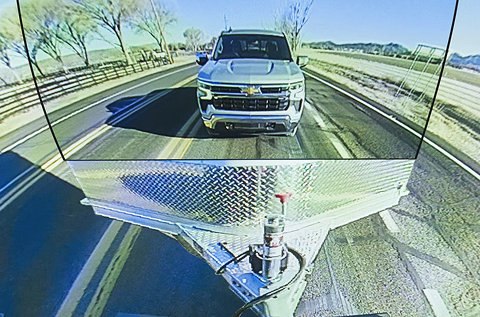
Hitch View is a close-up of the receiver hitch, so you can see the alignment from the driver's seat. Hitch Guidance overlays a guiding line that moves with your steering on the Rear Vision Camera image. Together they cut down on the climb out, look, climb back in routine of solo hookups.
On Silverado 1500, Hitch Guidance is available, so confirm the equipment on your truck with us. On Tahoe, Hitch Guidance is standard.
On equipped vehicles, engaging Hitch View and shifting into Park can automatically apply the electric parking brake. Neither view couples or secures the trailer for you. Back up slowly, then confirm the coupler, chains, and wiring physically.
Transparent Trailer and Trailer Length Indicator
Transparent Trailer View combines the rear camera with an accessory camera on a compatible trailer to virtually “see through” it to the area behind. It needs a Chevrolet Accessory trailer camera, plus setup and calibration in the app, and works with compatible box-type trailers up to 32 feet long. Silverado HD also offers an Enhanced Transparent Trailer View for fifth-wheel and gooseneck trailers. If a trailer blocks your mirrors, you no longer have to guess what is behind it.
Rear Side View shows the rear-facing side of the truck. With the turn signal on, Turn Signal View shows the side of the vehicle and trailer, with a red Trailer Length Indicator box to help you judge room for a lane change. The box is visible only when the trailer is straight. You can customize or turn off the view in settings or the app. It doesn't guarantee clearance, so keep checking mirrors and traffic.
Driver-Assist Towing Features: Super Cruise and Trailer Blind Zone Alerts
Super Cruise supports trailering on properly equipped vehicles. It detects an attached trailer and lengthens the following gap for added stopping distance. Super Cruise with trailering is available on the 2026 Silverado 1500, depending on trim and equipment. Tahoe lists available Super Cruise and describes hands-free towing on compatible roads. On long highway stretches, it takes some of the workload off you.
It still needs your attention. Super Cruise requires an active plan or trial, and Lane Change On Demand and Automatic Lane Change are unavailable while trailering.
Blind Zone Steering Assist with Trailering is listed on 2026 Tahoe. Availability on Silverado varies by model and equipment. When a moving vehicle sits in a side blind zone extended to trailer length, it alerts you and gives a brief, firm steering input, which saves you the long head-turn and guesswork before a merge. It does not alert you if the trailer itself crosses into an adjacent lane, so keep watching the trailer.
Available Trailer Side Blind Zone Alert extends that awareness even further. It gives you visual alerts when a moving vehicle is detected in a side blind zone that’s extended to cover the length of your trailer, so you can merge onto the Dallas North Tollway or the Sam Rayburn with more confidence. It’s available on Silverado and Tahoe models, depending on trim and equipment.
Core Towing Systems: Trailer Brake Controller, Sway Control, and Tow/Haul Mode
The integrated trailer brake controller, available on Silverado 1500, Silverado HD and Tahoe, ties into the vehicle’s ABS and StabiliTrak so trailer brakes work in sync with the vehicle’s brakes, with no aftermarket box under the dash. Trailer brakes are required above a 2,000-lb. trailer weight on Silverado and Tahoe, though state laws vary.
Trailer Sway Control senses sway and can apply the vehicle and trailer brakes and reduce engine power to help you stay on track. Standard Tow/Haul mode keeps the transmission from hunting for gears, and Cruise Grade Braking uses the engine and transmission to help hold your set speed on downhill grades.
Silverado vs. Tahoe: Trailering Features by Trim and Equipment
Silverado centers on pickup-bed utility, while Tahoe pairs enclosed passenger space with available trailering equipment. Don't read a trim badge as proof of towing capability. The Max Trailering Package and the camera or driver-assist packages meet different needs, and none of them comes automatically bundled with the others. Check the window sticker and the Chevrolet trailering guide for the exact vehicle.
The table below summarizes what we can verify. Everything varies by model year, trim, and equipment, so confirm with us.
| Feature | Silverado 1500 | Tahoe | Notes |
|---|---|---|---|
| Camera views | 8 available cameras, up to 14 views, depending on trim and equipment | Up to 14 views | Some views need an accessory camera |
| Hitch Guidance | Available | Standard | Overlay on Rear Vision Camera image |
| Hitch View | Standard on ZR2, LTZ and High Country; available on LT, RST and LT Trail Boss with Convenience Package II | Available on LT, RST, Z71, Premier and High Country with Advanced Trailering Package | Close-up of the receiver hitch |
| Transparent Trailer View | Standard on ZR2, LTZ and High Country; available on LT, RST and LT Trail Boss with Safety Package | Standard on High Country; available on LT, RST and Z71 with Luxury Package, and on Premier with Enhanced Display and Alert Package | Requires a Chevrolet Accessory trailer camera; compatible box-type trailers up to 32 ft. |
| Trailer Side Blind Zone Alert | Varies by model and equipment | Available | Alerts extend to trailer length |
| Super Cruise | Available with trailering on 2026 Silverado 1500, depending on trim and equipment | Available, varies by trim and equipment | Requires active plan or trial |
| Integrated trailer brake controller | Available | Available | Silverado HD also offers it |
| Tow/Haul mode | Standard | Standard | Does not raise capacity |
| Max tow rating | 13,300 lbs. Double Cab Standard Bed 2WD, Duramax 3.0L Turbo-Diesel I-6, Max Trailering Package, 20-inch wheels | 8,400 lbs. 2WD 5.3L V8 with Max Trailering Package | Applies only to these configurations |
Those ratings apply only to the named configurations. Other Silverados and Tahoes may differ. Engine, drivetrain, and equipment all shape a rating. If you are shopping for heavier needs, keep Silverado HD separate from Silverado 1500.
Matching Your Boat, Camper, or Work Trailer to the Right Setup
Start with your trailer’s actual loaded weight, including cargo, fluids and batteries, then check it against every limit on the Trailering Information Label on the driver-side doorjamb, including payload, GCWR and maximum tongue weight. Passengers and cargo reduce what you can tow.
For a boat, the app’s boat profile and launch tutorials, plus Hitch View and Rear Side View, make tight ramps easier; follow the trailer’s own tongue weight guidance. For a camper, Transparent Trailer View and the Trailer Length Indicator help with visibility and lane changes, and Super Cruise can ease long highway miles. For a work trailer, Hitch View, Hitch Guidance and custom checklists suit frequent solo hookups, and our fleet purchasing team can help if your business buys multiple vehicles.
Before any trip, check the hitch, safety chains, tire pressure on both vehicles and your electric trailer brakes.
Why Huffines Chevrolet Plano for Your Towing Setup
Towing questions are easier to answer in person, with the specific truck in front of you. We bring a few things to the conversation:
- We’re part of the family-owned Huffines Auto Dealerships, which opened as Huffines Motor Company on May 5, 1924, in downtown Denton.
- Our group has earned repeated Consumers Choice Award honors, including Auto Dealership Group of the Year, along with the Power Dealer of Excellence award.
- You'll find us at 1001 Coit Rd, Plano, TX, where our sales team can walk you through vehicle options, trims, and features.
Bring your trailer details and loaded weight, and we will help you check which packages a given vehicle actually has.
Test Drive a Trailering-Equipped Silverado or Tahoe Today
Ready to tow with total confidence? Tell us which trailering features you want to try, from Hitch View to Transparent Trailer, and our team will match you with a trailering-equipped Silverado or Tahoe and walk you through every camera view and app setting before you hit the road.
Call us at (888) 705-5980 or contact us online. Our sales hours are Monday through Saturday, 8:30 AM to 8 PM, at 1001 Coit Rd in Plano.